
CloudCTI
CloudCTI provides integration between Smokeball (and over 200 other CRM/ERP apps) with Xelion and other phone systems.
Description
CloudCTI seamlessly integrates Smokeball with all major phone, VoIP, and UCaaS systems, whether cloud-based or on-premises. See the full list at cloudcti.nl/telecom-systems.
By connecting Smokeball to your phone system, CloudCTI brings a suite of smart features designed to streamline the workflow of busy legal practices.
On both incoming and outgoing calls, callers are automatically recognised. Call times and durations are logged directly into Smokeball’s timekeeping system, and notes can be added instantly.
These automations save time, reduce errors, and ensure every phone minute is accurately captured, resulting in precise billing and effortless record-keeping.
These automations save time, reduce errors, and ensure every phone minute is accurately captured, resulting in precise billing and effortless record-keeping.
Installation is quick and straightforward, you’ll be up and running in just minutes.
Easy Implementation
Easy Implementation
- The intuitive CloudCTI Wizard automatically configures all necessary settings for Smokeball integration.
- The Wizard guides users step-by-step through the connection setup, making the process fast and effortless.
- No technical expertise required, simply follow the guided setup and you’ll be ready to go in minutes.
Media
Features
Comprehensive Feature Set for the Smokeball–Phone Integration
- Click-to-Call – Initiate a call instantly with a single mouse click or hotkey directly from Smokeball.
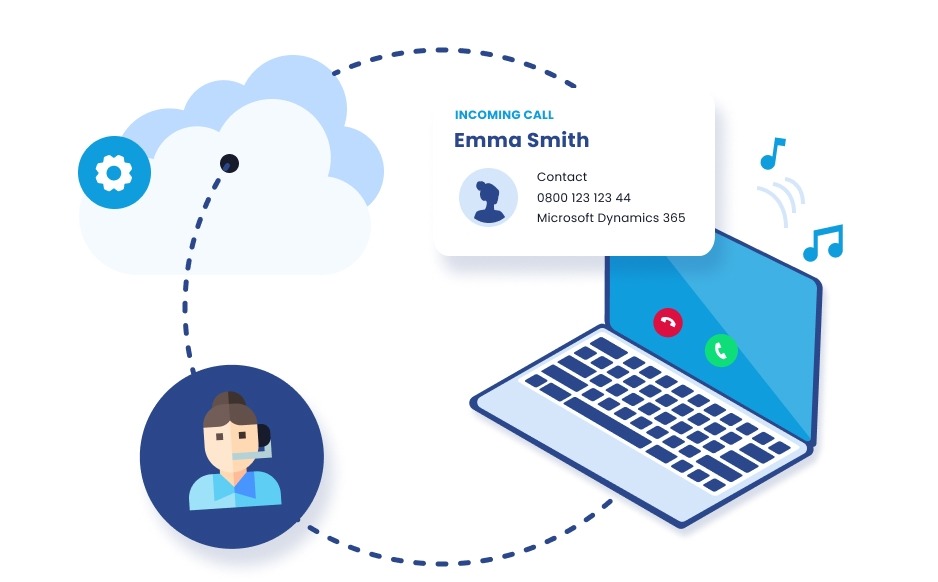
- Automatic Caller Recognition – When a call comes in, CloudCTI identifies the caller and displays their details from Smokeball in a discreet, non-intrusive notification.
- Customisable Notifications – Choose which Smokeball fields appear in the pop-up; the layout can include up to four lines of information (and more if space allows).
- Seamless Matching – Incoming and outgoing calls are automatically matched with the correct contact and matter in Smokeball.
- Automatic Call Logging – Phone number, call time, duration, and notes are automatically captured and recorded against the relevant matter in Smokeball.
- Matter-Centric Call Tracking – Track, record, and report on calls per matter for accurate billing and timekeeping.
- Multi-Match Recognition – If a number is linked to multiple records, CloudCTI displays all matching options for easy selection.
- One-Click Access – Open the caller’s Smokeball record instantly with a single mouse click for real-time context.
- Multiple CRM Compatibility – Recognition from several CRM applications can occur simultaneously, supporting firms using more than one system.
- Dynamic Data Display – Any data field available through the Smokeball API can be shown in the notification pop-up.
- Automatic Data Synchronisation – Caller recognition data is updated daily (or more frequently if preferred).
- Screen Pop Flexibility – Any record in Smokeball can be configured to pop up automatically on incoming or outgoing calls.
- Call Transfers Supported – Caller data and related screen pops follow the call when it is transferred to a colleague, ensuring continuity.
- Custom Action Buttons – Configure up to five additional action buttons for tasks such as opening other Smokeball screens, launching a different CRM view, creating a callback message, or copying the caller’s number for later use.
- Call Recording and Transcription – Record and transcribe calls when required, with operator control for compliance and privacy.
- Microsoft Teams Integration – Full integration with Teams–CRM environments is supported. For more details, visit cloudcti.nl/teams.
Call history
- View your call history from the past period, with filters for incoming and outgoing calls.
- Thanks to the cloud-based architecture, missed calls are logged even when users are not at their workspace or logged in, including caller identification.
- Easily return calls directly from the call history using the call button.
- Perform CRM screen pops and other actions directly from the call list.
- Calls can be deleted from the list for privacy reasons.
Search contacts in the CRM
- Search for contacts by name within your CRM application, with the option to search across multiple CRM platforms.
- Initiate an outbound call directly from the search results.
- Instantly open a CRM record (screen pop) from the search results.
- View a recent search history for quick reference.
Speed dial
- Maintain a fixed list of contacts that is always visible for quick dialling.
- Easily add new contacts to the speed dial list directly from the call history.
Call logging and labelling
- All calls are automatically logged in the CRM history and linked to the corresponding account or matter.
- Depending on the CRM, calls can be tagged with predefined labels such as Sale, Prospect, or other custom categories.
- Notes can also be added to each call record. Depending on your phone system’s capabilities, this may even include automatic syncing of call transcriptions or call summaries directly to the CRM.
Time registration
- The duration of each call is automatically recorded and linked to the relevant file in the CRM application.
- This feature is essential for industries where time spent on calls must be tracked and accounted for.
Click-to-call
- Initiate an outgoing call with a single mouse click or hotkey, saving time and reducing errors.
- This familiar mobile-like feature is often missing from business phone systems, but CloudCTI makes it available.
- Click-to-call works not only with phone numbers in the CRM application but also with any number on the desktop or any other document.
Caller Recognition and Screen Pop
- When an incoming call is recognised, the caller’s name and relevant information from the database are displayed in the CloudCTI notification (“toaster”).
- Any field from the database can be displayed, fully customisable to your needs.
- In some CRMs, caller information appears directly within the CRM interface.
- Multiple CRMs or databases can be integrated simultaneously, allowing real-time lookups across all systems.
- The notification appears discreetly without interrupting the user’s workflow.
- When a caller is recognised in the CRM, their contact record can be opened with a single mouse click, providing real-time context.
- Any screen within the CRM can be configured to pop up.
- When a call is transferred, the contact information is transferred along with it.
- Up to five additional automated actions or action buttons can be configured, for example, retrieving related data or triggering the appropriate follow-up process automatically.
Integration Diagrams
Data
Contacts
Contacts
Time Entry
Time Entry
Call Notes
Call Notes
Custom Fields
Custom Fields

Data
Contacts
Contacts
Call Duration
Call Duration
Call Notes
Call Notes
Custom Fields
Custom Fields